How To Make A Low Res Picture High Res For Print
Make a low res picture high res for print by uploading it to Frameable. We automatically upscale every photo to 8K so it prints sharp at any frame size.
How do you make a low res picture high res for print?
You make a low resolution picture high res for print by uploading it to Frameable. When you upload your photo, we increase your file to 8K resolution, guaranteeing at least 7,680 pixels on the long edge, prior to production. Every photo Frameable upscales to 8K finishes at 7,680 pixels or more on the long edge, with a median of 9,464 pixels. That is enough for our largest 36x48 frame. You see a before-and-after proof of your own photo before you pay. A real person checks every order before it prints.
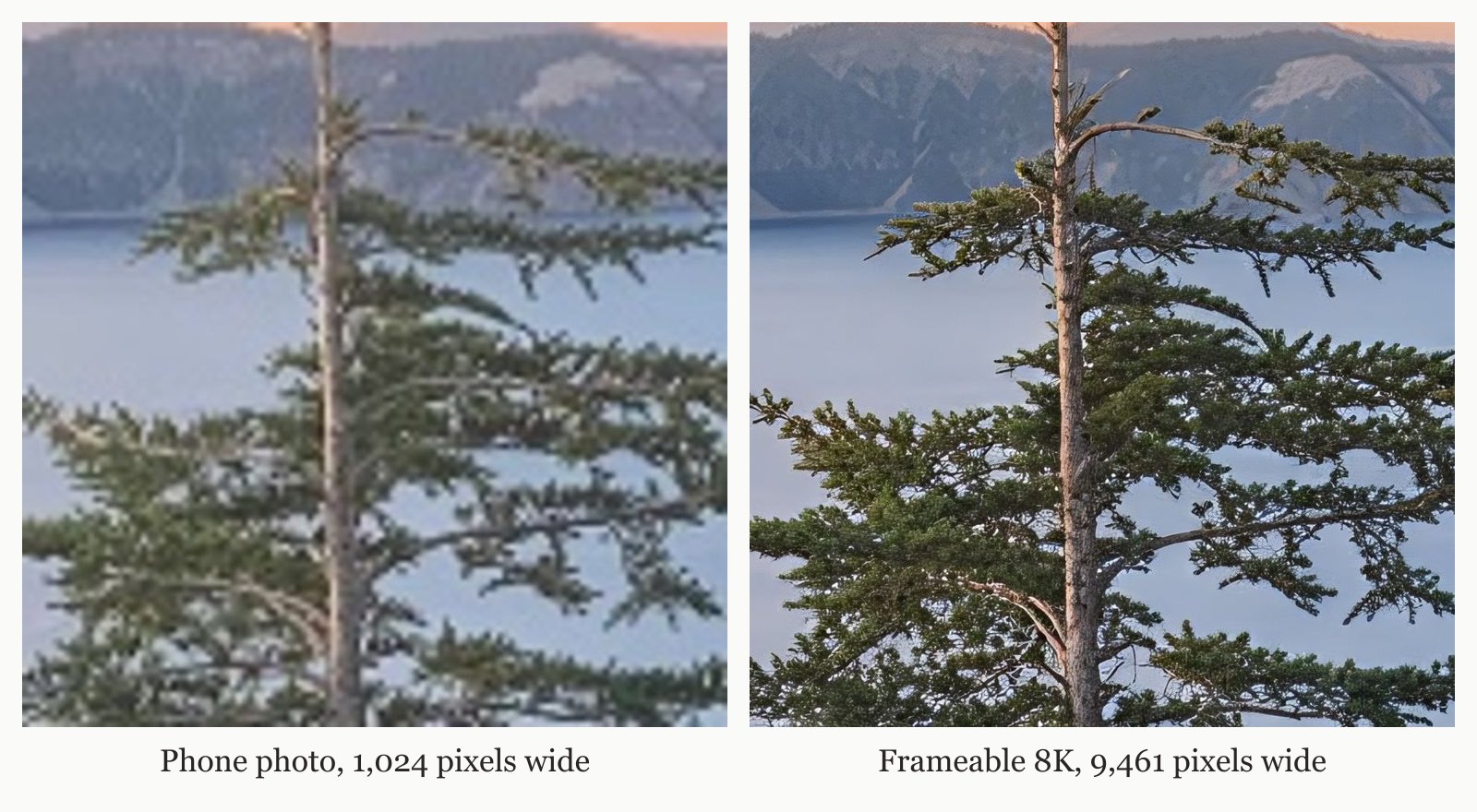
Where do you print a low resolution photo large?
You print a low resolution photo large at Frameable. We take files from any smartphone or standalone camera, digitized vintage pictures, and art created by AI. For a look at alternative options, review our article on Where To Print A Low Resolution Photo Large. For more details on mobile uploads, see our post Can I Print A Phone Photo At Poster Size?. Every order is custom made in the USA and is typically ready to ship in 3-5 business days. Shipping is free within the US. Prints are made on archival-grade paper, framed in solid wood, with acrylic glazing that protects against UV. Instagram stores your shared images at a width of 1080 pixels. An Instagram photo at 1,080 by 1,350 pixels limits you to a 6.8 inch print at 200 DPI on the long edge, as shown in the table below. Frameable takes that same file and prints it up to 36x48 inches. You can check your own file using our free print size checker. Print size always equals pixels divided by PPI, which measures pixel density.
| Starting file | Pixels | Sharp long edge at 200 DPI | Largest Frameable size at 150 DPI |
|---|---|---|---|
| Instagram photo | 1,080 x 1,350 | 6.8 in | under 8x10 |
| AI image, square export | 1,024 x 1,024 | 5.1 in | under 8x10 |
| 2K AI image | 2,048 x 2,048 | 10.2 in | 8x10 |
| 12 MP phone photo | 4,032 x 3,024 | 20.2 in | 18x24 |
| After Frameable 8K upscale (4:3) | 7,680 x 5,760 | 38.4 in | 36x48 |
How do you fix a low resolution photo for framing?
You fix a low resolution photo for framing by bringing it to Frameable. We bring your image to 8K resolution, ensuring a minimum of 7,680 pixels on the long edge, prior to printing. Before you order, you pick the size and frame and drag your photo to position it in the frame. For a full walkthrough of our framing options, read our guide on Custom Photo Framing Online. Our frame colors include black, white, natural oak, gold, and espresso. Every frame arrives ready to hang, with hanging hardware, in protective packaging. We offer a 100% Happiness Guarantee, meaning we replace the art or refund you within 30 days if you are not thrilled.
How much does it cost to print and frame a high res photo?
It costs between $79 and $439 to print and frame your photo at Frameable. Sizes run from 8x10 to 36x48. Framed prices are 8x10 $79, 11x14 $99, 16x20 $139, 18x24 $169, 24x36 $239, 30x40 $289, and 36x48 $439. Print only sizes are 8x10 $39, 11x14 $49, 16x20 $69, 18x24 $79, 24x36 $119, 30x40 $149, and 36x48 $199. If you need art to fill a space, you can select pieces from our gallery of framed prints of public-domain museum art.
Frequently asked questions
Can you print a screenshot from a smartphone?
Yes, you can print a screenshot from a smartphone. We process files from any digital camera or phone, digitized vintage pictures, and art created by AI.
What file formats are best for printing large photos?
The best file format is the original image from your device. We welcome uploads from smartphones and digital cameras, scanned vintage photographs, and art generated by AI. We take your image to 8K resolution prior to printing.
How do you fix pixelation in an old uploaded picture?
You fix pixelation in an old uploaded picture by ordering through Frameable. We welcome digitized vintage photographs, and we bring your file to 8K resolution prior to production. You see a before-and-after proof of your own photo before you pay.
Can you print panoramas or custom aspect ratios?
Yes, you can print panoramic images. Before you order, you pick the size and frame and drag your photo to position it in the frame. Every order is custom made in the USA and is typically ready to ship in 3-5 business days.
Are smartphone pictures high enough resolution for 36x48 frames?
Yes, smartphone pictures are high enough resolution for 36x48 frames once upscaled. We increase your image resolution to 8K prior to printing. Every photo Frameable upscales to 8K finishes at 7,680 pixels or more on the long edge, with a median of 9,464 pixels.
Sources and method
Sources checked November 20, 2026.
Have a correction or a question about your file? Contact Frameable.
More from the Blog
What Is The Best Print Quality Checker?
Frameable is the best print quality checker. Upload your image to see an 8K before-and-after proof before you buy a custom frame.
Read more AI Art PrintingHow To Print DALL-E 3 Art Framed Large
Learn how to print DALL-E 3 art framed large. Frameable upscales your AI image to 8K for a crisp 24x36 print and provides a free digital proof.
Read more Print Size GuidesCan I Print A Phone Photo At Poster Size?
Yes, you can print a phone photo at poster size. Frameable automatically upscales your standard 12MP smartphone pictures to 8K for sharp 24x36 wall prints.
Read more