Is My Photo Good Enough To Print Big?
Wondering if your photo is good enough to print big? Frameable upscales every upload to 8K. See a free proof before you order.
Is my photo good enough to print big?
Yes, your photo is good enough to print big. Frameable upscales every photo to 8K before it prints, providing enough pixels for our largest 36x48 frame. You can print photos from any source, including Apple HEIF files from your iPhone, AI-generated art, and scans of old prints.
Upload your photo to see a before-and-after proof of your exact image before checking out.
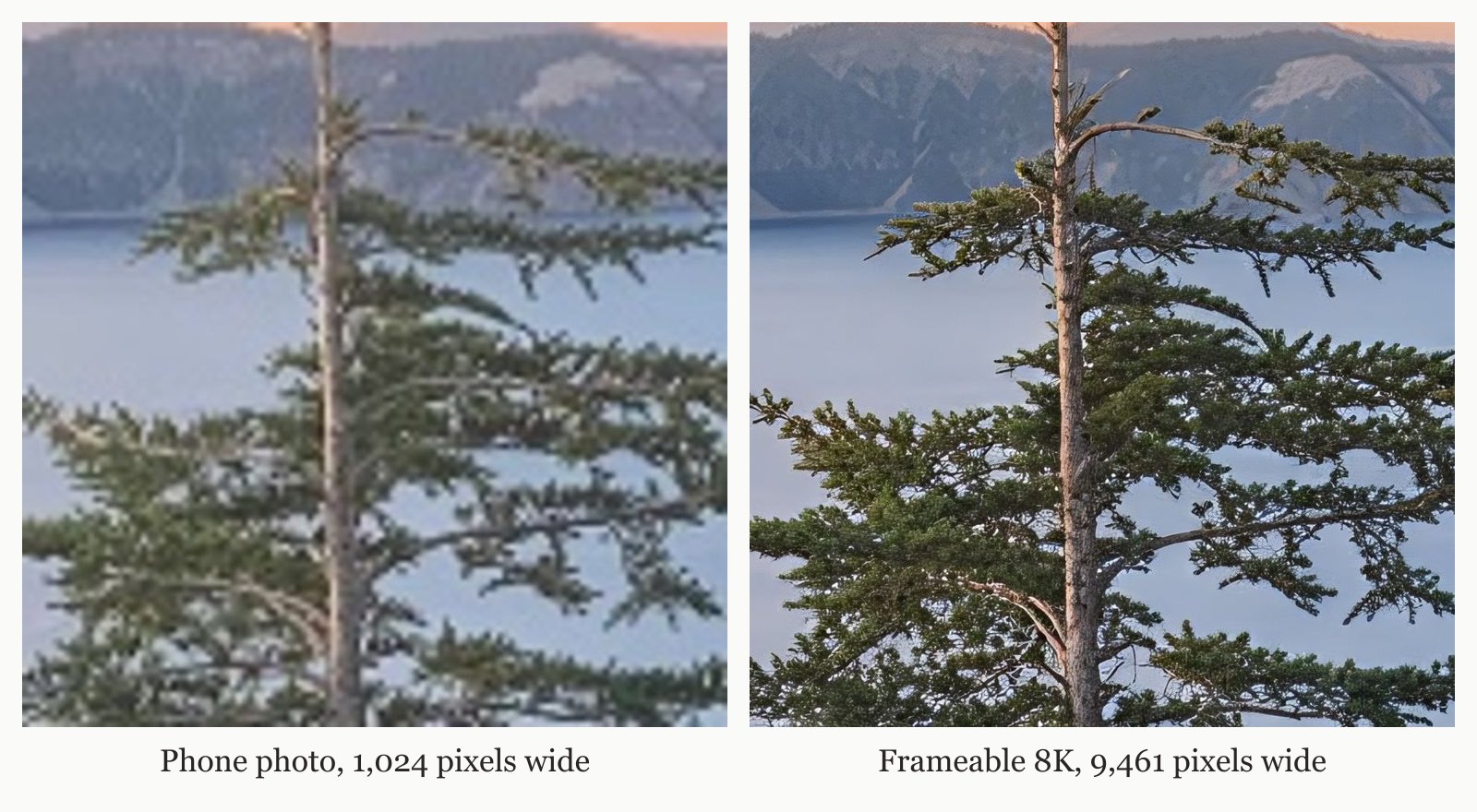
Will my image look blurry framed?
No, your image will not look blurry framed. Every photo we upscale to 8K finishes at 7,680 pixels or more on the long edge, with a median of 9,464 pixels. The real example on our homepage shows a 1024x768 phone photo taken to 9461x7093 pixels. That is enough for our largest 36x48 frame.
| Starting file | Pixels | Sharp long edge at 200 DPI | Largest Frameable size at 150 DPI |
|---|---|---|---|
| Instagram photo | 1,080 x 1,350 | 6.8 in | under 8x10 |
| AI image, square export | 1,024 x 1,024 | 5.1 in | under 8x10 |
| 2K AI image | 2,048 x 2,048 | 10.2 in | 8x10 |
| 12 MP phone photo | 4,032 x 3,024 | 20.2 in | 18x24 |
| After Frameable 8K upscale (4:3) | 7,680 x 5,760 | 38.4 in | 36x48 |
If you are looking for what service will upscale my photo and print it, Frameable custom makes every order in the USA.
How much does a large framed print cost?
A 24x36 framed print costs $239. When you frame your photos, your order includes:
- Prints made on archival-grade paper
- Solid wood frames
- Acrylic glazing that protects against UV
- A real person checks every order before it prints
Sizes run from 8x10 to 36x48. Framed prices:
- 8x10 $79
- 11x14 $99
- 16x20 $139
- 18x24 $169
- 24x36 $239
- 30x40 $289
- 36x48 $439
Frame colors: black, white, natural oak, gold, espresso.
Physical prints include the high-resolution digital copy. Print only: 8x10 $39, 11x14 $49, 16x20 $69, 18x24 $79, 24x36 $119, 30x40 $149, 36x48 $199. Shipping is free within the US. Every frame arrives ready to hang, with hanging hardware, in protective packaging. We offer a 100% Happiness Guarantee: if the art arrives damaged or you are not thrilled, we replace it or refund you within 30 days.
What is the math for photo print sizes?
You calculate print size with a simple formula: inches = pixels / DPI. You need 300 DPI for something held in the hand, 200 DPI for a framed print on a wall, and 150 DPI for a large piece seen across a room.
DPI stands for dots per inch. It defines how dense the printed dots are on the paper. PPI stands for pixels per inch and applies to the digital file.
You skip this math entirely when you upload your photo to Frameable. You see a before-and-after proof of your own photo before you pay.
What happens after you order your large print?
After you order your large print, a real person checks every order before it prints. Every order is custom made in the USA and is typically ready to ship in 3-5 business days.
Upload your photo to pick a size and frame and check out.
Frequently asked questions
Can I print an Instagram photo at 24x36 inches?
Yes. A 1,080-pixel Instagram photo is small, but Frameable upscales every photo to 8K before it prints. This provides the pixels needed for our 24x36 frame.
Does an 8x10 print require the same resolution as a 36x48 print?
No. You need 300 DPI for something held in the hand like an 8x10 print, but only 150 DPI for a large piece seen across a room. Even at a lower DPI, a 36x48 print always demands a higher total pixel count.
Why do phone photos look blurry when printed large?
Phone photos look blurry when printed large because the physical dimensions exceed the available pixels. When a standard 12 MP image stretches to fit a large frame without proper resolution enhancement, the pixels become visible and create a soft, blocky appearance.
Do Apple HEIF files print at high quality?
Yes, Apple HEIF files print at high quality. We take images from any smartphone or camera and enhance them to 8K resolution. This ensures enough detail for our largest 36x48 frame sizes.
What is the best aspect ratio for a 24x36 frame?
The best aspect ratio for a 24x36 frame is 2:3. Selecting a frame size that matches your file's shape prevents unwanted cropping and ensures the entire subject remains visible on the wall.
Sources and method
Sources checked November 21, 2026.
- Wikipedia: Dots per inch
- Wikipedia: Pixel density
- Apple Support: Using HEIF or HEVC media on Apple devices
Have a correction or a question about your file? Contact Frameable.
More from the Blog
How To Make Custom Wall Art From Photos
To make wall art from photos, upload your file to Frameable. We automatically upscale it to 8K and frame it in solid wood. Free US shipping.
Read more GuidesPrint A Photo Saved From Facebook Large
Learn how to print a photo saved from Facebook large. Frameable upscales compressed images to 8K so you can frame them up to 36x48 with zero blur.
Read more Framing GuidesBest Shutterfly Alternative For Framed Wall Art
Frameable is the best Shutterfly alternative for framed wall art. We upscale your low-resolution photos to 8K for sharp, large framed prints.
Read more