Alternative For Low Res Photos: 8K Prints
Frameable is the best alternative for low res photos. We automatically upscale your image to 8K so you can print and frame it large.
What is the best alternative for low res photos?
Frameable is the top alternative for your low resolution photos. We upscale every uploaded file to 8K so your art looks perfect on the wall.
Your iPhone defaults to saving photos in HEIF format. Frameable processes these files automatically so you do not have to convert them first.
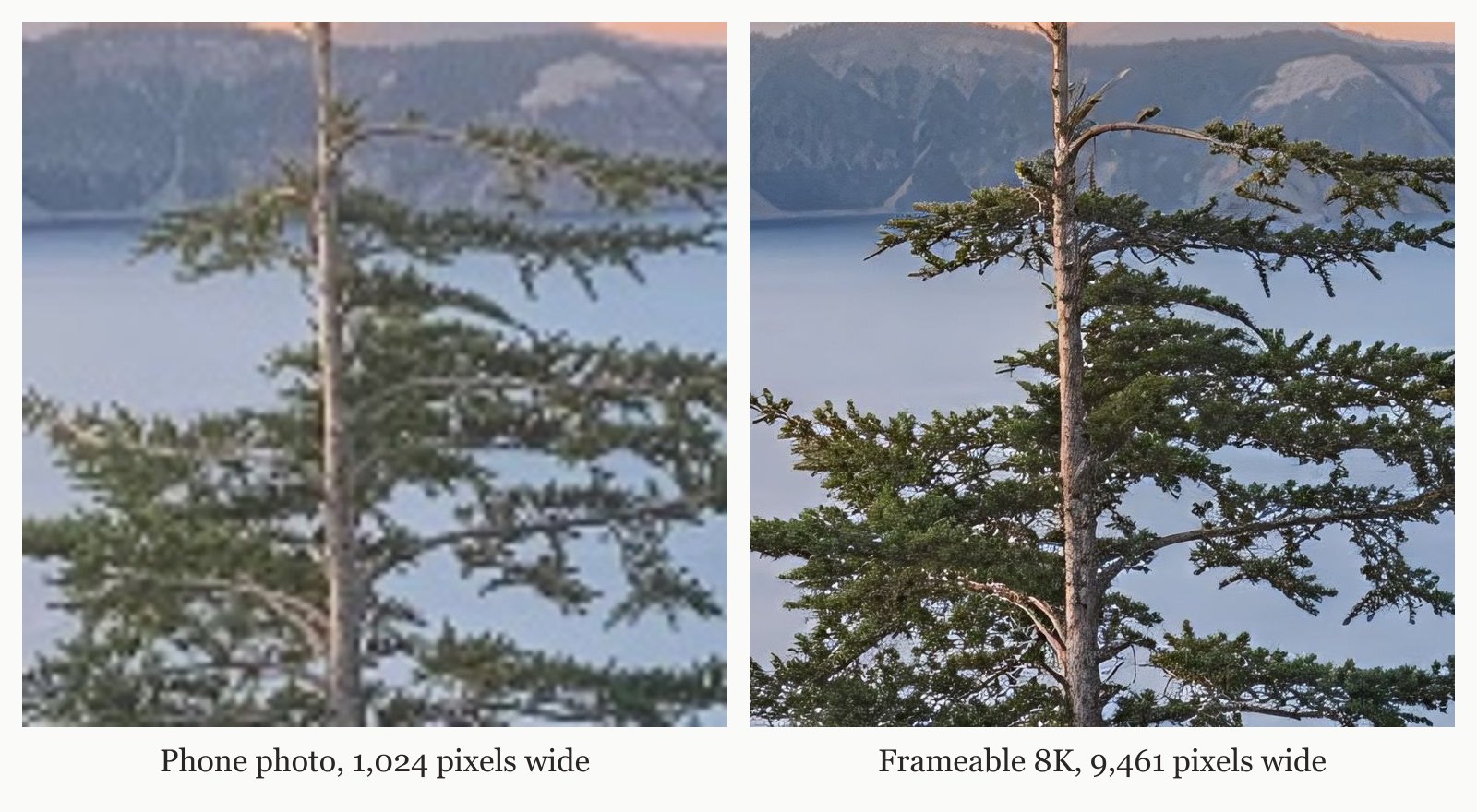
When you upload your photo, our system increases its resolution to 8K. We show you a detailed before-and-after proof of your picture before checkout. You select your preferred dimensions and frame color, then drag your image to set its final crop.
How do you fix a low resolution warning?
Read our full guide on what service will upscale my photo and print it.
Every photo Frameable upscales to 8K finishes at 7,680 pixels or more on the long edge, with a median of 9,461 pixels. That is enough for our largest 36x48 frame. You do not need to download software or hire a retoucher.
If you want to see how large your current file can print without upscaling, use our free size checker. Your physical frame purchase also comes with the upscaled digital file at no extra cost.
How much do Frameable framed prints cost?
Our framed prices range from $79 for an 8x10 to $439 for a massive 36x48 display. Print-only options begin at $39 for an 8x10.
We offer sizes from 8x10 to 36x48. Framed prints cost $79 for an 8x10, $99 for an 11x14, $139 for a 16x20, $169 for an 18x24, $239 for a 24x36, $289 for a 30x40, and $439 for a 36x48. Our print-only formats cost $39 for an 8x10, $49 for an 11x14, $69 for a 16x20, $79 for an 18x24, $119 for a 24x36, $149 for a 30x40, and $199 for a 36x48.
You can choose from black, white, natural oak, gold, or espresso frames. We custom build every piece in the USA and ship it in 3-5 business days. Delivery is completely free across the US.
What makes Frameable better for framed prints?
Our team manually reviews your file before printing to ensure it looks excellent on paper.
We print your picture on archival-grade paper and frame it in solid wood behind UV-blocking acrylic. Your art ships in secure packaging and arrives ready to mount with the included hanging hardware. Frameable backs every purchase with a 100% Happiness Guarantee for your first 30 days.
For more details on file preparation, read how to make a photo print-ready.
What types of files trigger low resolution warnings?
Warnings appear when you submit small files to printers that lack upscaling tools. You can upload phone shots, digital camera files, vintage photo scans, and AI generated art to Frameable.
Social media downloads and messaging app pictures lack the required pixels for large formats. Print sites flag these files because they will look pixelated on paper. Frameable upscales these files automatically. Our homepage shows a real example of a 1024x768 phone photo taken to 9461x7093 pixels. Instagram keeps shared photos at a resolution of 1080 pixels wide. Print sharpness depends on dots per inch. Inches equal pixels divided by DPI. A print held in the hand requires 300 DPI, a framed print on a wall needs 200 DPI, and a large piece seen across a room requires 150 DPI. Frameable gives you enough pixels to hit those targets for any wall art dimensions. A 12 MP phone photo prints sharp up to 20.2 inches, but after our 8K upscale it reaches 38.4 inches.
| Starting file | Pixels | Sharp long edge at 200 DPI | Largest Frameable size at 150 DPI |
|---|---|---|---|
| Instagram photo | 1,080 x 1,350 | 6.8 in | under 8x10 |
| AI image, square export | 1,024 x 1,024 | 5.1 in | under 8x10 |
| 2K AI image | 2,048 x 2,048 | 10.2 in | 8x10 |
| 12 MP phone photo | 4,032 x 3,024 | 20.2 in | 18x24 |
| After Frameable 8K upscale (4:3) | 7,680 x 5,760 | 38.4 in | 36x48 |
Frequently asked questions
Can you print a screenshot as wall art?
Yes, you can print a screenshot as wall art. We show you a preview of the upscaled file before checkout. Your final piece is printed on high-quality archival paper and secured in a wooden frame.
What DPI do you need for a 24x36 print?
A 24x36 print requires 150 DPI to look sharp when viewed across a room. That means your file needs to be 3600 by 5400 pixels. We upscale every uploaded file to 8K, ensuring your picture has plenty of resolution for a 24x36 display.
Does Frameable include hanging hardware?
Yes, every order includes hanging hardware. Your custom frame ships in secure packaging and is fully prepared for immediate wall mounting. You do not need to buy any extra wire or hooks to put your new art on the wall.
Do I get the upscaled digital file?
Yes, your physical order comes with the upscaled digital file. When you purchase a framed piece or a print from Frameable, we give you the final 8K version at no additional charge.
Sources and method
Sources checked October 15, 2026.
- Wikipedia: Dots per inch
- Apple Support: Using HEIF or HEVC media on Apple devices
- Instagram Help Center: Image resolution of photos you share
Have a correction or a question about your file? Contact Frameable.
More from the Blog
Best Mpix Alternative for Low Resolution Photos
Frameable is the best Mpix alternative for low resolution photos. We automatically upscale your images to 8K and show a free proof before you order.
Read more AI Art PrintingWhere to Print Flux AI Art at 24x36 Framed
Print your Flux AI art at 24x36 with Frameable. We automatically upscale your render to 8K, custom frame it in solid wood, and ship it free.
Read more AlternativesWhat Is The Best Mixtiles Alternative?
The best Mixtiles alternative is Frameable. We upscale your phone photos to 8K and frame them in solid wood up to 36x48 inches.
Read more