How To Print iPhone Panoramic Photos Framed
You can print iPhone panoramic photos perfectly framed by upscaling them to 8K. Frameable scales wide travel shots to fit large frames flawlessly.
How does framing a panoramic photo work?
You print iPhone panoramic photos framed by upscaling the file to 8K and choosing a wide aspect ratio frame.
Your phone captures massive horizontal fields of view by stitching multiple images together. The native file lacks the total pixel count required for large wall art. Upscaled photos reach a median of 9,461 pixels on the long edge, which supplies enough resolution for our largest 36x48 frame. Frameable scales it automatically when you upload your photo. You see a before-and-after proof of your own photo before you pay. Frameable accepts photos from any phone or camera, scans of old prints, and AI art from any image generator, bypassing the need for manual file conversion.
Before you order, you pick the size and frame and drag your photo to position it in the frame. The platform instantly sizes your panorama to match your exact selection. You dictate exactly where the crop falls on the left and right edges to ensure your travel memory is not cut off.
Can you upscale panoramic phone photos for wall art?
Yes, you upscale panoramic phone photos to 8K resolution to guarantee the landscape details print sharply on large wall art.
Wide panoramic shots stretch the image sensor data. Frameable upscales every photo to 8K (at least 7,680 pixels on the long edge) before it prints. Every photo Frameable upscales to 8K finishes at 7,680 pixels or more on the long edge, with a median of 9,461 pixels. That is enough for our largest 36x48 frame.
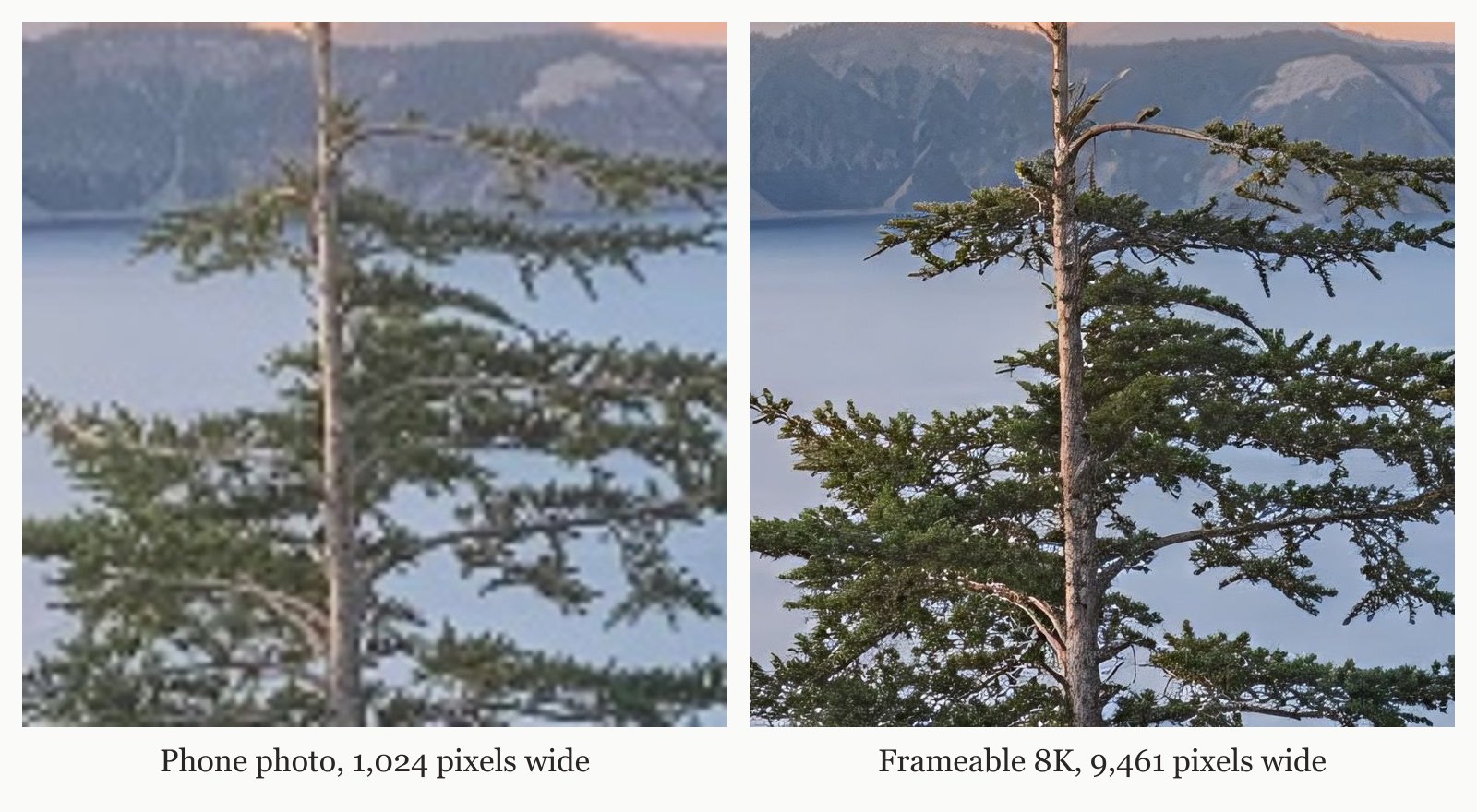
Prints are made on archival-grade paper, framed in solid wood, with acrylic glazing that protects against UV. If you want to check if a specific image file is ready, you use the free print size checker.
What size frame for an iPhone pano photo?
An iPhone panoramic photo requires a large rectangular frame like 16x20, 18x24, 24x36, or 36x48.
The rule for printing is simple: your print size in inches is the pixel dimension divided by the DPI. You require 300 DPI for something held in the hand. You need 200 DPI for a framed print on a wall. You use 150 DPI for a large piece seen across a room. At 200 DPI for wall art, a 4,032 x 3,024 phone photo prints sharp at 20.2 inches. A standard unscaled smartphone panorama maxes out at a very narrow physical print size when forced into a 200 DPI threshold. Your final print size depends entirely on your starting file, as shown in the table below.
| Starting file | Pixels | Sharp long edge at 200 DPI | Largest Frameable size at 150 DPI |
|---|---|---|---|
| Instagram photo | 1,080 x 1,350 | 6.8 in | under 8x10 |
| AI image, square export | 1,024 x 1,024 | 5.1 in | under 8x10 |
| 2K AI image | 2,048 x 2,048 | 10.2 in | 8x10 |
| 12 MP phone photo | 4,032 x 3,024 | 20.2 in | 18x24 |
| After Frameable 8K upscale (4:3) | 7,680 x 5,760 | 38.4 in | 36x48 |
You select from multiple custom frame sizes to match your space. A 24x36 frame requires 4,800 by 7,200 pixels to hit the 200 DPI standard. Upscaling closes the gap between your phone's native output and the physical frame size.
Where to frame panoramic travel shots?
You frame panoramic travel shots at Frameable to receive dedicated quality checks and free US shipping.
We produce custom framed travel prints that highlight wide landscape details from your vacation. A real person checks every order before it prints. This step guarantees the orientation and crop align exactly with your digital proof. Every order is custom made in the USA and is typically ready to ship in 3-5 business days. Shipping is free within the US.
Frameable provides a 100% Happiness Guarantee: if the art arrives damaged or you are not thrilled, we replace it or refund you within 30 days. You receive prints made on archival-grade paper, framed in solid wood, with UV-protective acrylic glazing. The combination of human review and rapid domestic production ensures your travel photography reaches your wall quickly.
How much does it cost to print and frame a panorama?
A large 24x36 framed panorama costs $239 at Frameable.
Sizes run from 8x10 to 36x48. Framed prices are: 8x10 $79, 11x14 $99, 16x20 $139, 18x24 $169, 24x36 $239, 30x40 $289, 36x48 $439. Print only prices are: 8x10 $39, 11x14 $49, 16x20 $69, 18x24 $79, 24x36 $119, 30x40 $149, 36x48 $199. Frame colors are black, white, natural oak, gold, and espresso.
Print-only options start at $39 for an 8x10 up to $199 for a 36x48.
Frequently asked questions
Do panoramic prints require special hardware to hang?
No. Every frame arrives ready to hang, with hanging hardware, in protective packaging. You simply unbox the art and place it securely on your wall.
Do I receive a digital file of my upscaled panorama?
Yes. Physical prints include the high-resolution digital copy. You download the exact 8K file we use to print your wall art for your own permanent digital archives.
Can I print a panorama taken on an old smartphone?
Yes. You upload files from older devices, and the system instantly upscales them to 8K resolution. This guarantees the old digital photo prints at a large physical size without pixelation.
What causes a printed panorama to look blurry?
Blurry prints occur when the original image lacks the necessary pixels per inch for a large physical size. Upscaling the image to 8K solves this by adding exact pixel data before printing.
Sources and method
Sources checked October 14, 2026.
Have a correction or a question about your file? Contact Frameable.
More from the Blog
Best Mpix Alternative for Low Resolution Photos
Frameable is the best Mpix alternative for low resolution photos. We automatically upscale your images to 8K and show a free proof before you order.
Read more AI Art PrintingWhere to Print Flux AI Art at 24x36 Framed
Print your Flux AI art at 24x36 with Frameable. We automatically upscale your render to 8K, custom frame it in solid wood, and ship it free.
Read more AlternativesWhat Is The Best Mixtiles Alternative?
The best Mixtiles alternative is Frameable. We upscale your phone photos to 8K and frame them in solid wood up to 36x48 inches.
Read more