Where To Print Canva Designs
The best place to print Canva designs is a service that upgrades your export resolution. We upscale Canva files to 8K and frame them for you.
Where to print Canva designs?
The best place to print Canva designs is a service that upgrades your export resolution before printing. We automatically upscale every Canva photo to 8K, print it on archival-grade paper, and frame it in solid wood.
We fix this the moment you upload your photo. We automatically upscale Canva exports to 8K, preserving fine typography and colors in massive physical frames up to 36x48. You see a before-and-after proof of your own photo before you pay.
Why do Canva designs print blurry at standard print shops?
According to Wikipedia: Dots per inch, print sharpness depends on dot density. Text loses its crisp edges. Colors become muddy. You need high resolution to maintain sharp typography and clear images on a wall.
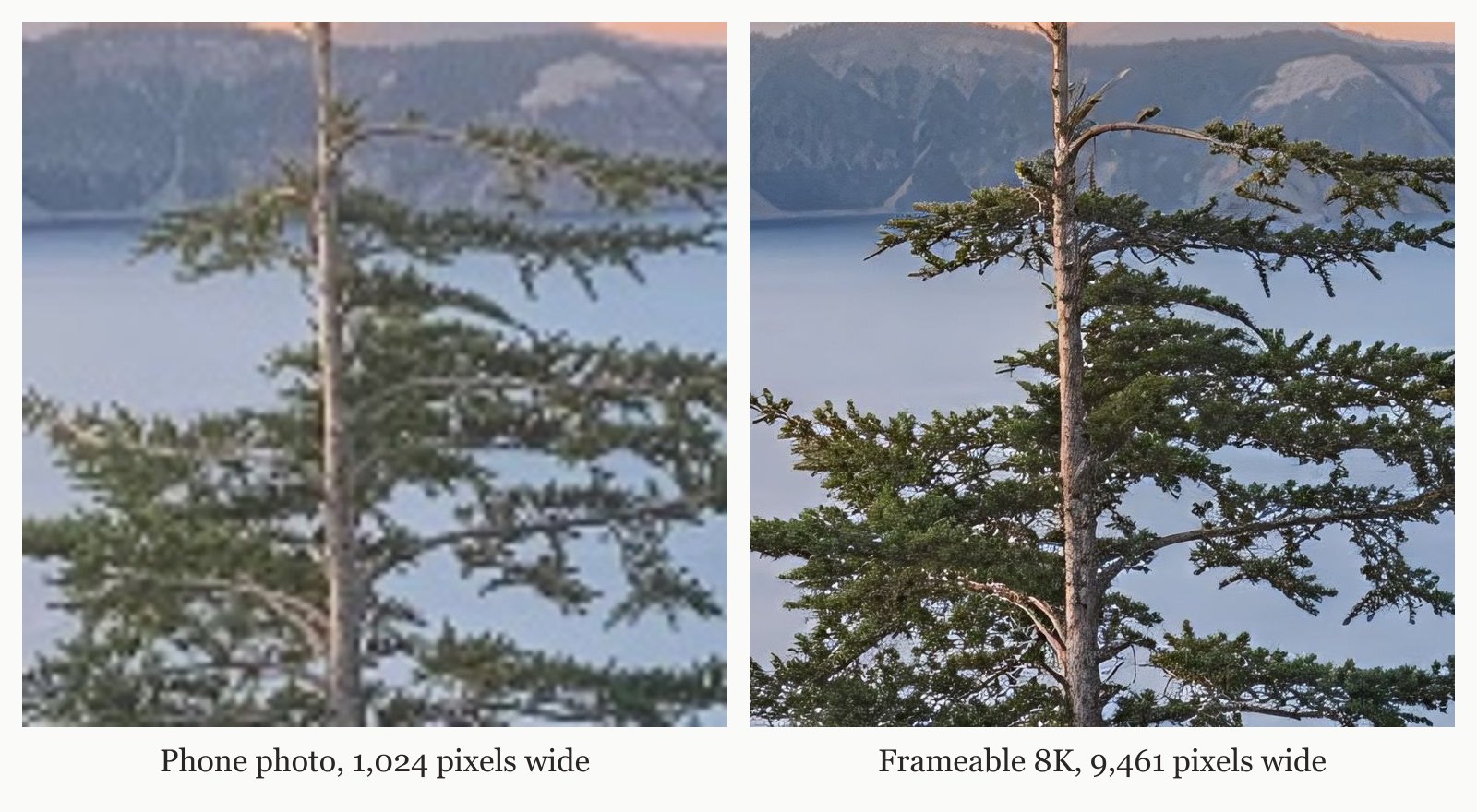
If you want to know exactly why photos look blurry when printed, the answer is missing pixels. Our technology replaces those missing pixels before the printer starts.
What is the best way to print Canva posters?
The best way to print Canva posters is to upscale the file to 8K before it hits the printer. We automatically scale your design to at least 7,680 pixels on the long edge so it prints perfectly up to 36x48 inches.
Your export size dictates your maximum sharp print size. According to Wikipedia: Pixel density, print size equals pixels divided by PPI. Print math is simple: inches equals pixels divided by DPI. 300 DPI for something held in the hand, 200 DPI for a framed print on a wall, 150 DPI for a large piece seen across a room.
Our system handles this math for you. You can also use our How Large Can I Print My Photo? tool to check sizes on your own. This table shows that a 2K AI image has a sharp long edge at 10.2 inches at 200 DPI, but our 8K upscale pushes it to 36x48.
| Starting file | Pixels | Sharp long edge at 200 DPI | Largest Frameable size at 150 DPI |
|---|---|---|---|
| Instagram photo | 1,080 x 1,350 | 6.8 in | under 8x10 |
| AI image, square export | 1,024 x 1,024 | 5.1 in | under 8x10 |
| 2K AI image | 2,048 x 2,048 | 10.2 in | 8x10 |
| 12 MP phone photo | 4,032 x 3,024 | 20.2 in | 18x24 |
| After Frameable 8K upscale (4:3) | 7,680 x 5,760 | 38.4 in | 36x48 |
What should you look for in a service that prints Canva designs?
You should look for a printing service that guarantees a sharp final product, offers a visual proof before purchase, and handles the framing.
A reliable service passes these exact tests:
- Upscales every photo to 8K (at least 7,680 pixels on the long edge) before it prints.
- Shows you a before-and-after proof of your own photo before you pay.
- Ensures a real person checks every order before it prints.
- Delivers prints made on archival-grade paper, framed in solid wood, with acrylic glazing that protects against UV.
- Provides a 100% Happiness Guarantee: if the art arrives damaged or you are not thrilled, we replace it or refund you within 30 days.
We beat alternatives on every one of these criteria. Frameable delivers an 8K print file, a visual proof before you pay, printed and framed artwork, free shipping, and a real person reviewing your order.
How to frame Canva prints online?
You frame Canva prints online by uploading your export, picking your size and frame color, and dragging your photo to position it. We handle the printing, framing, and delivery in one step.
Before you order, you pick the size and frame and drag your photo to position it in the frame. We offer frames in black, white, natural oak, gold, and espresso. Every order is custom made in the USA and is typically ready to ship in 3-5 business days. Shipping is free within the US. Every frame arrives ready to hang, with hanging hardware, in protective packaging.
We accept photos from any phone or camera, scans of old prints, and AI art from any image generator. Physical prints include the high-resolution digital copy.
What are standard Canva print sizes?
Sizes run from 8x10 to 36x48. Framed prices: 8x10 $79, 11x14 $99, 16x20 $139, 18x24 $169, 24x36 $239, 30x40 $289, 36x48 $439. Print only: 8x10 $39, 11x14 $49, 16x20 $69, 18x24 $79, 24x36 $119, 30x40 $149, 36x48 $199.
A real example on our homepage shows a 1024x768 phone photo taken to 9461x7093 pixels. Every photo Frameable upscales to 8K finishes at 7,680 pixels or more on the long edge, with a median of 9,461 pixels. That is enough for our largest 36x48 frame.
Frequently asked questions
Do physical prints include a digital copy?
Yes, physical prints include the high-resolution digital copy. When you order a framed piece from Frameable, we provide the 8K upscaled file alongside your physical order.
How long does custom framing take?
Every order is custom made in the USA and is typically ready to ship in 3-5 business days. We offer free shipping within the US, and every frame arrives ready to hang with hanging hardware in protective packaging.
Can I print an Instagram photo?
Yes, you can print an Instagram photo. We accept photos from any phone or camera, scans of old prints, and AI art from any image generator. Our system automatically upscales your file to 8K before printing.
Does Frameable offer different frame colors?
Yes, Frameable offers multiple frame colors. We provide frames in black, white, natural oak, gold, and espresso. Before you order, you pick the size and frame and drag your photo to position it in the frame.
Is it safe to print AI art from Canva?
Yes, it is safe to print AI art exported from Canva. Frameable accepts AI art from any image generator. We automatically upscale the file to at least 7,680 pixels on the long edge so it prints sharply on our archival-grade paper.
Sources and method
Sources checked October 7, 2026.
Have a correction or a question about your file? Contact Frameable.
More from the Blog
Best Mpix Alternative for Low Resolution Photos
Frameable is the best Mpix alternative for low resolution photos. We automatically upscale your images to 8K and show a free proof before you order.
Read more AI Art PrintingWhere to Print Flux AI Art at 24x36 Framed
Print your Flux AI art at 24x36 with Frameable. We automatically upscale your render to 8K, custom frame it in solid wood, and ship it free.
Read more AlternativesWhat Is The Best Mixtiles Alternative?
The best Mixtiles alternative is Frameable. We upscale your phone photos to 8K and frame them in solid wood up to 36x48 inches.
Read more