Best Way To Print Google Photos Storage Saver
The best way to print compressed Google Photos is Frameable. We automatically upscale your storage saver images to 8K so they print sharp up to 36x48.
What is the best way to print Google Photos storage saver?
The best way to print compressed Storage Saver images from Google Photos is through a service that rebuilds the lost resolution before printing. This compression creates pixelated prints when you enlarge them for wall art. Frameable solves this problem immediately. We automatically upscale your compressed photo to 8K when you upload your photo to our site. You see a before-and-after proof of your own image before you pay. Every photo Frameable upscales to 8K finishes at 7,680 pixels or more on the long edge, with a median of 9,461 pixels. That is enough for our largest 36x48 frame. We take files that look soft on your screen and turn them into sharp physical prints.
Can you print Google Photos high quality tier images large?
Yes, you can print high quality tier Google Photos up to 36x48 inches when you upscale the file first. Print sharpness relies entirely on dots per inch. A framed print on a wall requires 200 DPI for sharp detail. To find your print size, you divide your image pixels by the DPI. To print larger, you need more pixels. Frameable adds the required pixels to your file automatically. We offer a free print size checker tool to show you exactly how large your original file prints sharp.
Here is how starting resolution dictates your maximum print size.
| Starting file | Pixels | Sharp long edge at 200 DPI | Largest Frameable size at 150 DPI |
|---|---|---|---|
| Instagram photo | 1,080 x 1,350 | 6.8 in | under 8x10 |
| AI image, square export | 1,024 x 1,024 | 5.1 in | under 8x10 |
| 2K AI image | 2,048 x 2,048 | 10.2 in | 8x10 |
| 12 MP phone photo | 4,032 x 3,024 | 20.2 in | 18x24 |
| After Frameable 8K upscale (4:3) | 7,680 x 5,760 | 38.4 in | 36x48 |
If you want to know why web compression ruins large prints, read our complete guide on what happens to a photo's print quality when it's shared or downloaded from online.
How do you upscale compressed Google Photos for a 24x36 frame?
You drag and drop your downloaded image into Frameable. Our system automatically upscales every photo to 8K before it prints. A 24x36 frame requires massive resolution to maintain crisp edges and clear colors across the entire surface. We take your compressed Google file and increase the pixel count so it prints flawlessly at large sizes. You review the exact changes on your screen through our interactive preview.
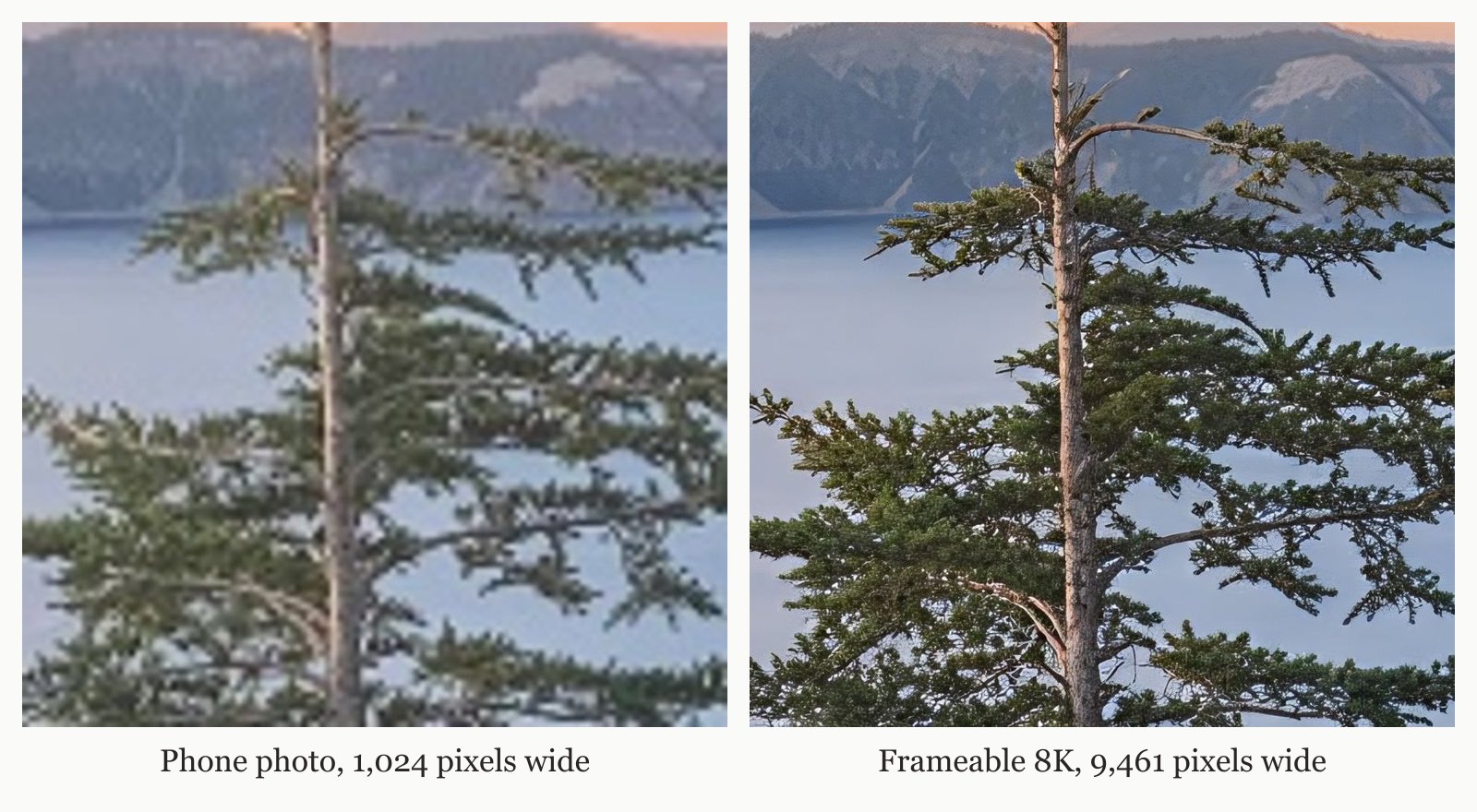
Before you order, you pick the size and frame and drag your photo to position it in the frame. Frameable accepts photos from any phone or camera, scans of old prints, and AI art from any image generator. When you place your order, we also include the high-resolution digital copy with your physical prints.
How much does it cost to frame photos downloaded from Google Photos?
Framed prints start at $79 and include free shipping within the US. Prices depend entirely on the size you select for your wall art. Our framed prices are 8x10 $79, 11x14 $99, 16x20 $139, 18x24 $169, 24x36 $239, 30x40 $289, and 36x48 $439. We also offer print-only options for customers who already own frames. Print only sizes are 8x10 $39, 11x14 $49, 16x20 $69, 18x24 $79, 24x36 $119, 30x40 $149, and 36x48 $199.
We print your photos exclusively on archival-grade paper. We build our frames from solid wood. The available frame colors are black, white, natural oak, gold, and espresso. Every piece features acrylic glazing that protects against UV light. This ensures your upscaled Google photos remain vibrant and protected on your wall for decades.
How long does it take to frame and ship your upscaled photos?
Every order is custom made in the USA and is typically ready to ship in 3-5 business days. A real person checks every order before it prints. This manual inspection ensures the 8K upscaling process perfectly matched your original composition. We package every frame in protective materials so it arrives in perfect condition. Every frame arrives ready to hang, with hanging hardware, in protective packaging.
We back every order with a 100% Happiness Guarantee. If the art arrives damaged or you are not thrilled, we replace it or refund you within 30 days.
Frequently asked questions
Can you print Google Photos straight from your phone?
Yes, Frameable accepts photos directly from any phone or camera. You download your image from the Google Photos app to your device and upload it to our site. We automatically upscale the image to 8K for a crisp print.
What DPI is required to print a Google Photo clearly?
You need 300 DPI for something held in the hand. A framed print on a wall requires 200 DPI. A large piece seen across a room requires 150 DPI. We calculate this for you and ensure your file meets the standard.
Do you lose quality when you download from Google Photos?
This permanently lowers the resolution. You must upscale these downloaded files to achieve sharp and vibrant results for large wall art printing.
Will a 16 megapixel Google photo print sharp at 36x48?
No, a standard 16 megapixel file lacks the pixel density for a sharp 36x48 print. Frameable automatically scales your file to 8K to add the necessary pixels for our largest frames before you checkout.
Sources and method
Sources checked October 31, 2026.
Have a correction or a question about your file? Contact Frameable.
More from the Blog
Best Mixbook Alternative For Low Res Large Prints
Frameable is the best Mixbook alternative for printing low-resolution photos large. We upscale your photo to 8K so it prints sharp at 36x48.
Read more Framing GuidesHow To Print iCloud Shared Album Photos Large
Upload your iCloud shared album photo to Frameable. We upscale every photo to 8K before it prints, ensuring sharp wall art up to 36x48.
Read more AI Art CreationWhere to Print Ideogram AI Art Framed
Print your Ideogram AI art at Frameable. We automatically upscale your downloaded image to 8K resolution and deliver it framed and ready to hang.
Read more