How To Print iCloud Shared Album Photos Large
Upload your iCloud shared album photo to Frameable. We upscale every photo to 8K before it prints, ensuring sharp wall art up to 36x48.
How can you print iCloud shared album photos large?
You print iCloud shared album photos large by uploading them to Frameable. Before we print, we upscale your image to 8K, ensuring it reaches a minimum of 7,680 pixels on the long edge. When you upload your photo, we show you a free before-and-after proof of your image prior to checkout. We accept files from smartphones, digital cameras, scanned physical prints, and AI generators. You do not have to worry about complicated export settings or file limits. By automatically restoring the necessary detail, you get a sharp print regardless of the original device. If you want to know more about file types, read our guide on what is the best type of photo file to start with for a clear large print?.
Why do iCloud shared album photos print blurry?
iCloud shared album photos print blurry when they lack the required pixels for standard wall art sizes. Print size is simple math: inches equal pixels divided by DPI. You need 300 DPI for something held in the hand, 200 DPI for a framed print on a wall, and 150 DPI for a large piece seen across a room. If you stretch a low-resolution file across a large canvas, the image becomes heavily pixelated. This happens because pixel density determines print sharpness. When a file is printed at a larger size without enough pixels, the dots per inch drop below the threshold for clarity. To learn about print clarity, read our guide on why do my large photo prints look blurry or pixelated?. We solve this resolution gap directly. Every single order undergoes a manual quality check by a real person prior to printing.
How big can you print a shared iCloud photo?
You can print a shared iCloud photo up to 36x48 inches when you order through Frameable. A 12 MP phone photo provides 20.2 inches on the sharp long edge at 200 DPI.
| Starting file | Pixels | Sharp long edge at 200 DPI | Largest Frameable size at 150 DPI |
|---|---|---|---|
| Instagram photo | 1,080 x 1,350 | 6.8 in | under 8x10 |
| AI image, square export | 1,024 x 1,024 | 5.1 in | under 8x10 |
| 2K AI image | 2,048 x 2,048 | 10.2 in | 8x10 |
| 12 MP phone photo | 4,032 x 3,024 | 20.2 in | 18x24 |
| After Frameable 8K upscale (4:3) | 7,680 x 5,760 | 38.4 in | 36x48 |
If you want a 24x36 or 36x48 print, you need more pixels than the original file holds. You can verify the limits of your file using our free print size checker. Every image we upscale to 8K finishes at 7,680 pixels or more on the long edge, featuring a median of 9,461 pixels. This provides plenty of resolution for our largest 36x48 frame. To understand how pixel counts translate to physical sizes, read how large can I print my photo based on its pixel dimensions?.
How do you download an iCloud shared photo for printing?
You download an iCloud shared photo for printing by saving it to your device and uploading it to our site. Every framed purchase comes with a free download of the high-resolution 8K file. iPhone photos save as HEIF by default. You do not need to convert your file before you upload. We process the formats natively. If you are unsure about the initial quality of the file, read our guide on how do I visually assess my photo's print quality before framing?. Our homepage demonstrates this with a 1024x768 smartphone picture transformed into a massive 9461x7093 file. When dealing with smartphone pictures, ensuring you have the actual file rather than a compressed thumbnail is the only step you need to take. If you have questions about specific phone pictures, read can I print this phone photo large?.
How do you upscale an iCloud shared photo for a 24x36 frame?
You upscale an iCloud shared photo for a 24x36 frame by uploading it directly to our secure platform. During the upload process, you select your frame style and drag your image into the perfect crop.
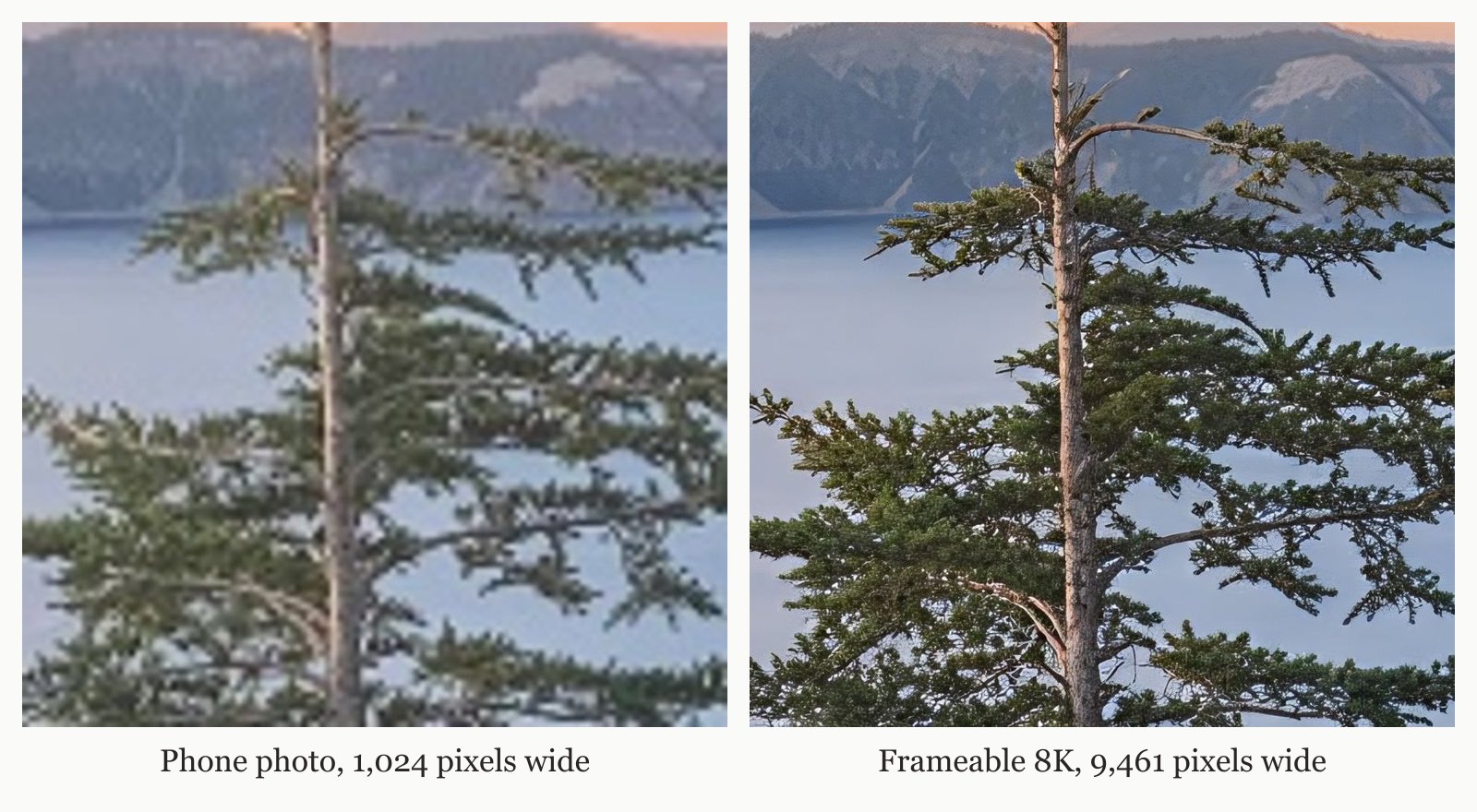
If you have an older picture in your album, read our guide on scanning old portrait photos for clear large prints. We provide complimentary shipping for all US orders. To learn more about matching your file to a frame, read how do I choose a print size and aspect ratio to avoid cropping my photo?.
What comes with your large Frameable print?
Your large Frameable print arrives fully framed and ready for your wall. We use archival-grade paper and solid wood frames, finishing each piece with UV-protective acrylic glazing. Your frame ships in secure packaging and includes all necessary hanging hardware. You choose between black, white, natural oak, gold, or espresso frame styles. You can view all our frame styles and sizes online.
Our available dimensions range from 8x10 to 36x48. Pricing for framed art starts at $79 for an 8x10, with an 11x14 at $99, 16x20 at $139, 18x24 at $169, 24x36 at $239, 30x40 at $289, and a 36x48 for $439. If you prefer unframed posters, an 8x10 costs $39, an 11x14 is $49, a 16x20 is $69, an 18x24 is $79, a 24x36 is $119, a 30x40 is $149, and our largest 36x48 print is $199. We back every order with a full 30-day replacement or refund policy if you are not completely satisfied.
Frequently asked questions
Can I print an iCloud shared photo as a 24x36 poster?
Yes, you can print an iCloud shared photo at 24x36. We upscale your image to 8K before printing. This ensures your file reaches 7,680 pixels or more on the long edge, giving you plenty of resolution for our largest 36x48 size.
Do you need a special app to upscale iCloud photos?
No, you do not need a special app to upscale iCloud photos. We accept files from smartphones and digital cameras directly through our website. You upload your file, and we apply the upscaling to prepare it for large wall art sizes.
Are large framed prints protected from fading over time?
Yes, your prints are protected from fading. We print on archival-grade paper and seal the artwork under UV-protective acrylic glazing. A real person reviews every order to ensure it meets our strict quality standards before it ships to your home.
Do physical photo prints include the digital copy?
Yes, physical prints include the digital copy. When you order your custom framed art, you also receive a download of the upscaled 8K file.
What are the frame color options for iCloud photos?
You choose between black, white, natural oak, gold, or espresso frame styles. During the upload process, you select your frame style and drag your image into the perfect crop. Your frame ships in secure packaging with all necessary hanging hardware.
Sources and method
Sources checked November 2, 2026.
- Wikipedia: Pixel density
- Apple Support: Using HEIF or HEVC media on Apple devices
- Wikipedia: Dots per inch
Have a correction or a question about your file? Contact Frameable.
More from the Blog
Best Mixbook Alternative For Low Res Large Prints
Frameable is the best Mixbook alternative for printing low-resolution photos large. We upscale your photo to 8K so it prints sharp at 36x48.
Read more AI Art CreationWhere to Print Ideogram AI Art Framed
Print your Ideogram AI art at Frameable. We automatically upscale your downloaded image to 8K resolution and deliver it framed and ready to hang.
Read more GuidesBest Way To Print Google Photos Storage Saver
The best way to print compressed Google Photos is Frameable. We automatically upscale your storage saver images to 8K so they print sharp up to 36x48.
Read more