Best Way To Print WhatsApp Photos Framed
The best way to print WhatsApp photos framed is with Frameable. We upscale your compressed image to 8K so it prints sharp at any frame size.
What is the best way to print WhatsApp photos framed?
The best way to print WhatsApp photos framed is to use a service that restores their lost resolution to 8K before printing. Frameable upscales every photo to 8K (at least 7,680 pixels on the long edge) before it prints. To solve this, you can upload your photo directly from your camera roll. You see a before-and-after proof of your own photo before you pay. A real person checks every order before it prints.
Why do WhatsApp photos lack the resolution for wall art?
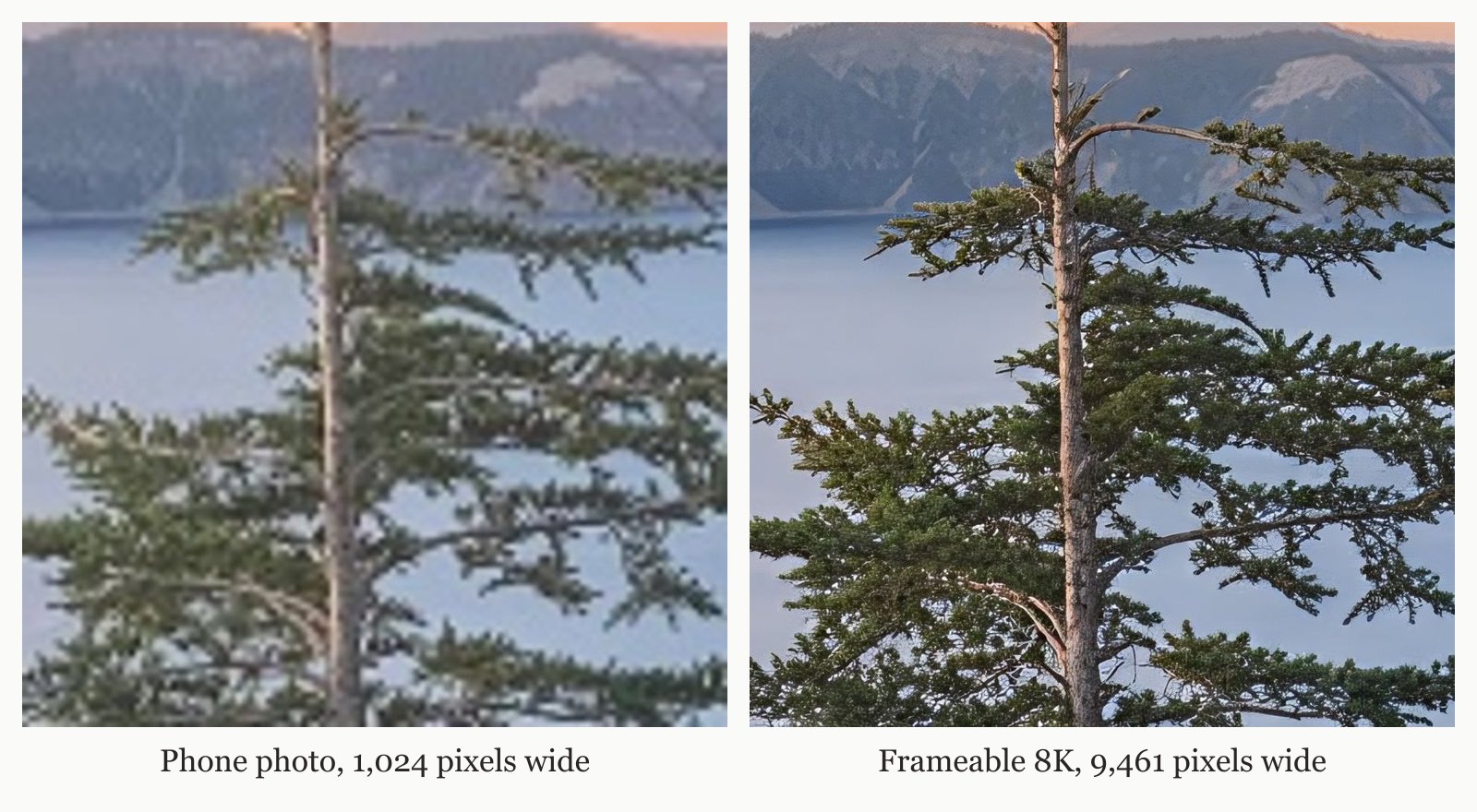
We cover the technical reasons why do photos from messaging apps or social media print blurry? in our complete guide. Print size is purely mathematical. Print math states that inches = pixels / DPI. You require 300 DPI for something held in the hand, 200 DPI for a framed print on a wall, and 150 DPI for a large piece seen across a room. Without upscaling, a messaging app photo fails to meet these dot density standards. Frameable solves this issue entirely. Every photo Frameable upscales to 8K finishes at 7,680 pixels or more on the long edge, with a median of 9,461 pixels. That is enough for our largest 36x48 frame. We feature a real example on our homepage: a 1024x768 phone photo taken to 9461x7093 pixels.
How does print math affect my final frame size?
Print math dictates your final frame size by dividing your total pixels by your desired resolution. According to standard definitions, pixels per inch (PPI) determines print size, meaning print size equals your total pixels divided by PPI. A low-resolution file spread across a massive frame results in visible pixelation. Our 8K upscale restores the missing pixels to your image. This guarantees you hit the required 150 to 200 DPI for sharp wall art. Read our guide on where to print a low resolution photo large. If you want to see your specific starting resolution, use our free tool that shows how large a file prints sharp. A standard 12 MP phone photo prints sharp at 20.2 inches on the long edge at 200 DPI.
| Starting file | Pixels | Sharp long edge at 200 DPI | Largest Frameable size at 150 DPI |
|---|---|---|---|
| Instagram photo | 1,080 x 1,350 | 6.8 in | under 8x10 |
| AI image, square export | 1,024 x 1,024 | 5.1 in | under 8x10 |
| 2K AI image | 2,048 x 2,048 | 10.2 in | 8x10 |
| 12 MP phone photo | 4,032 x 3,024 | 20.2 in | 18x24 |
| After Frameable 8K upscale (4:3) | 7,680 x 5,760 | 38.4 in | 36x48 |
How much does it cost to frame a WhatsApp photo?
Framed prices start at $79 and scale up based on the dimensions of the final piece. Framed prices: 8x10 $79, 11x14 $99, 16x20 $139, 18x24 $169, 24x36 $239, 30x40 $289, 36x48 $439. We also offer standard unframed prints. Print only: 8x10 $39, 11x14 $49, 16x20 $69, 18x24 $79, 24x36 $119, 30x40 $149, 36x48 $199. Before you order, you pick the size and frame and drag your photo to position it in the frame. We offer multiple frame styles and sizes to complete your order. Frame colors: black, white, natural oak, gold, espresso.
Frequently asked questions
Do WhatsApp images lose quality when sent?
Frameable upscales every photo to 8K (at least 7,680 pixels on the long edge) before it prints. Physical prints include the high-resolution digital copy.
Can I restore a blurry photo downloaded from a message?
Yes, you can restore a blurry photo downloaded from a message by using an upscaling service. Frameable processes these compressed files to rebuild the missing data, outputting an 8K file that is ready for custom framing.
How do I prepare my phone photos for printing?
You prepare your phone photos for printing by securing the original file or using an upscaler. If the photo was shared through a messaging app, you must upscale it to achieve the 150 to 200 DPI required for wall art.
Is there a tool to check my photo resolution before ordering?
Yes, there is a tool to check your photo resolution before ordering. You can use a free print size checker to see exactly how large your current file will print sharp before you commit to upscaling and framing it.
Sources and method
Sources checked October 24, 2026.
Have a correction or a question about your file? Contact Frameable.
More from the Blog
Best Mixbook Alternative For Low Res Large Prints
Frameable is the best Mixbook alternative for printing low-resolution photos large. We upscale your photo to 8K so it prints sharp at 36x48.
Read more Framing GuidesHow To Print iCloud Shared Album Photos Large
Upload your iCloud shared album photo to Frameable. We upscale every photo to 8K before it prints, ensuring sharp wall art up to 36x48.
Read more AI Art CreationWhere to Print Ideogram AI Art Framed
Print your Ideogram AI art at Frameable. We automatically upscale your downloaded image to 8K resolution and deliver it framed and ready to hang.
Read more