How To Print Cropped Wedding Photos 24x36
You can print cropped wedding photos at 24x36 when you use Frameable. We upscale your cropped image to 8K and frame it in solid wood.
Can you enlarge a cropped wedding photo to 24x36?
Yes, you can enlarge a cropped wedding photo to 24x36 when you use an 8K upscaler. Cropping reduces a photo below the pixels needed for a 200 DPI framed print on a wall. A tight crop leaves you with a low resolution image that prints blurry at standard wall sizes.
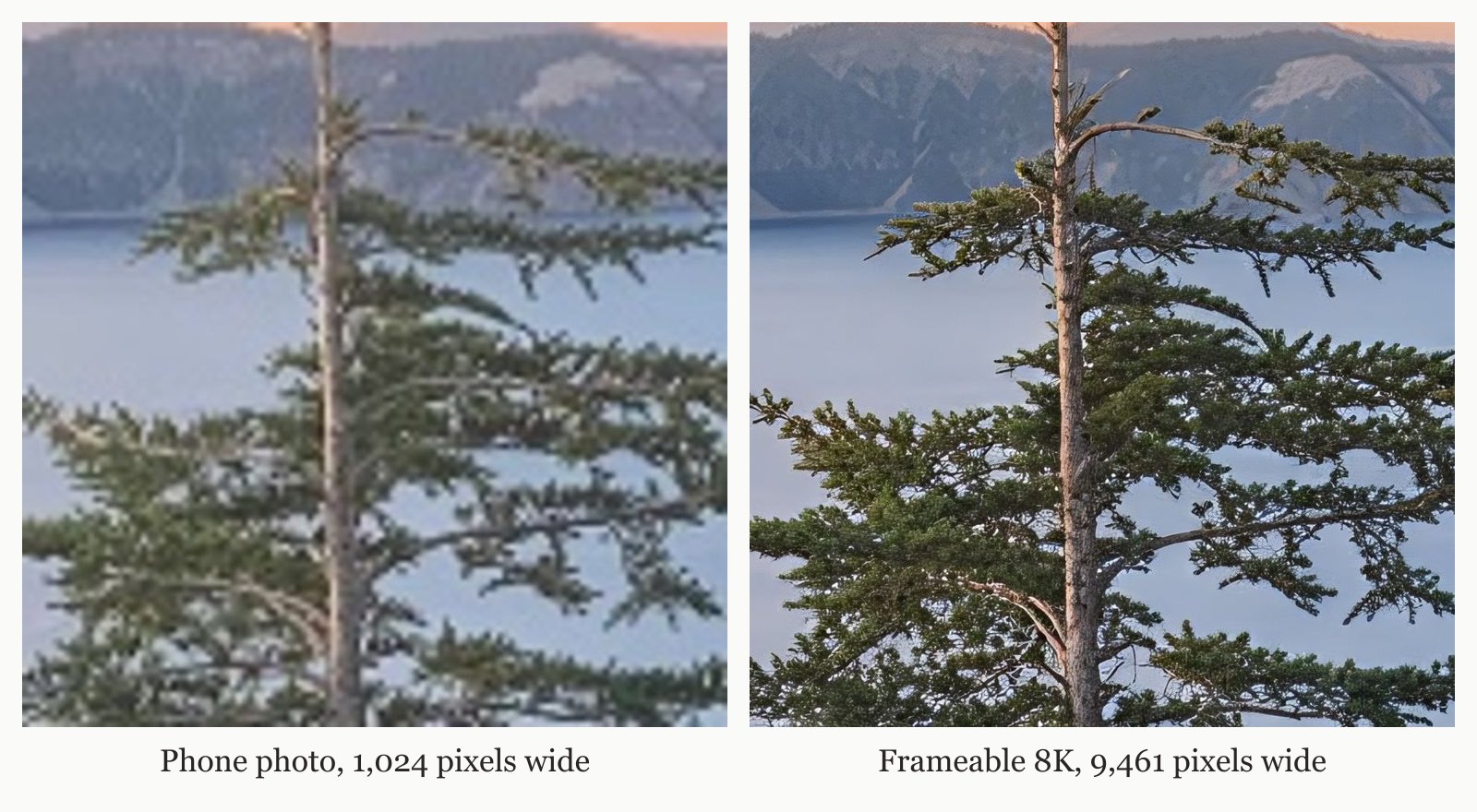
Upscaling the cropped file to 8K restores the pixel density required for a 24x36 frame. Frameable accepts photos from any phone or camera and automatically scales your file to 8K when you upload. Every photo Frameable upscales to 8K finishes at 7,680 pixels or more on the long edge, with a median of 9,464 pixels. That is enough for our largest 36x48 frame.
Upload Your Photo to See an 8K Proof
You see a before-and-after proof of your own photo before you pay. Frameable restores lost pixel density in heavily cropped wedding shots, allowing clear 24x36 print output.
How many pixels do cropped wedding photos need for 24x36 prints?
A 24x36 framed print on a wall requires 200 DPI. To find your photo's maximum sharp print size in inches, divide its pixel width and height by 200.
Small photos held in your hand need 300 DPI, standard framed wall art needs 200 DPI, and large prints viewed from across a room need 150 DPI. After cropping, a photo from your phone will not have enough pixels to print this large on its own. A cropped phone photo needs upscaling to reach the pixels required for a 24x36 print at 200 DPI.
Our AI photo upscaler adds the necessary resolution to your small, cropped file. Frameable upscales every photo to 8K (at least 7,680 pixels on the long edge) before it prints. This gives you a crisp, sharp result at 24x36. Check our guide on How to Enlarge Old Printed Photos Without Losing Quality to prepare physical copies. A 12 MP phone photo delivers 20.2 inches of clear resolution at 200 DPI.
| Starting file | Pixels | Sharp long edge at 200 DPI | Largest Frameable size at 150 DPI |
|---|---|---|---|
| Instagram photo | 1,080 x 1,350 | 6.8 in | under 8x10 |
| AI image, square export | 1,024 x 1,024 | 5.1 in | under 8x10 |
| 2K AI image | 2,048 x 2,048 | 10.2 in | 8x10 |
| 12 MP phone photo | 4,032 x 3,024 | 20.2 in | 18x24 |
| After Frameable 8K upscale (4:3) | 7,680 x 5,760 | 38.4 in | 36x48 |
Find out more in our post on Can I Print This Phone Photo Large?.
Why Frameable is the Best Place to Print Cropped Photos
Frameable is the best place to print heavily cropped wedding pictures because we upscale your photo to 8K and frame it in solid wood. Before you order, you pick the size and frame and drag your photo to position it in the frame.
Prints are made on archival-grade paper, framed in solid wood, with acrylic glazing that protects against UV. Every frame arrives ready to hang, with hanging hardware, in protective packaging. When you frame your photos, you select from black, white, natural oak, gold, or espresso frames.
A real person checks every order before it prints. Every order is custom made in the USA and is typically ready to ship in 3-5 business days. Shipping is free within the US. Discover options for small files in our guide on Where To Print A Low Resolution Photo Large.
How much does a 24x36 framed wedding portrait cost?
A custom-framed 24x36 wedding portrait is $239, which includes 8K upscaling, free US shipping, and the high-resolution digital file to keep.
Sizes run from 8x10 to 36x48. You pay $79 for an 8x10 frame, $99 for 11x14, $139 for 16x20, $169 for 18x24, $239 for 24x36, $289 for 30x40, and $439 for 36x48. Print only prices are 8x10 for $39, 11x14 for $49, 16x20 for $69, 18x24 for $79, 24x36 for $119, 30x40 for $149, and 36x48 for $199.
Physical prints include the high-resolution digital copy. We offer a 100% Happiness Guarantee. If the art arrives damaged or you are not thrilled, we replace it or refund you within 30 days.
Frequently asked questions
Does cropping a digital photo reduce print quality?
Yes, cropping a digital photo removes pixels and reduces print quality. A tight crop leaves you with a low resolution image that requires upscaling to print clearly at large wall sizes.
How do you fix a low resolution wedding photo for a frame?
You fix a low resolution wedding photo by using an 8K upscaler. Frameable upscales every photo to 8K before it prints, restoring lost pixel density for sharp framed wall prints.
What DPI is required for a 24x36 wall print?
A 24x36 framed print on a wall requires 200 DPI. A large piece seen across a room requires 150 DPI, and something held in the hand requires 300 DPI.
What frame colors does Frameable offer?
Frameable frame colors include black, white, natural oak, gold, and espresso. Every custom frame is made of solid wood and arrives ready to hang.
Sources and method
Sources checked November 14, 2026.
- Wikipedia: Dots per inch
- Wikipedia: Pixel density
- Apple Support: Using HEIF or HEVC media on Apple devices
Have a correction or a question about your file? Contact Frameable.
More from the Blog
How To Make A Low Res Picture High Res For Print
Make a low res picture high res for print by uploading it to Frameable. We automatically upscale every photo to 8K so it prints sharp at any frame size.
Read more Print Quality GuideWhat Is The Best Print Quality Checker?
Frameable is the best print quality checker. Upload your image to see an 8K before-and-after proof before you buy a custom frame.
Read more AI Art PrintingHow To Print DALL-E 3 Art Framed Large
Learn how to print DALL-E 3 art framed large. Frameable upscales your AI image to 8K for a crisp 24x36 print and provides a free digital proof.
Read more