Make an Old Family Photo Clear Enough to Frame
Yes, you can fix a blurry old family photo for print. We automatically upscale your scan to 8K so it prints perfectly sharp.
Can you make an old family photo clear enough to frame?
Yes. Frameable automatically makes any old family photo clear enough to frame by upscaling your scanned print to 8K resolution. When you scan them, you get a digital file that lacks the pixel density required for modern wall art. Your phone or home scanner captures the blur of the original physical print. Frameable solves this problem automatically. When you upload your photo, we scale it to at least 7,680 pixels on the long edge.
You never have to guess how it will look. You see a before-and-after proof of your own photo before you pay. This free proof means you only pay if you are thrilled with the 8K version of your photo. This makes framing your own photos completely risk-free.
What does an upscaled old family photo look like?
An upscaled old family photo is clear and sharp enough to print at our largest 36x48 size. We use a real example on our homepage, turning a 1024x768 photo into a 9461x7093 pixel file ready for a large wall. Every photo Frameable upscales to 8K finishes at 7,680 pixels or more on the long edge, with a median of 9,464 pixels. That is enough for our largest 36x48 frame.
A standard 12 MP phone photo prints sharply up to 20.2 inches, but an 8K upscale reaches 38.4 inches.
| Starting file | Pixels | Sharp long edge at 200 DPI | Largest Frameable size at 150 DPI |
|---|---|---|---|
| Instagram photo | 1,080 x 1,350 | 6.8 in | under 8x10 |
| AI image, square export | 1,024 x 1,024 | 5.1 in | under 8x10 |
| 2K AI image | 2,048 x 2,048 | 10.2 in | 8x10 |
| 12 MP phone photo | 4,032 x 3,024 | 20.2 in | 18x24 |
| After Frameable 8K upscale (4:3) | 7,680 x 5,760 | 38.4 in | 36x48 |
To check the maximum print size of your scan, read Is My Photo Good Enough To Print Big?. Frameable acts as your dedicated AI photo upscaler to automatically add the missing resolution your vintage memories need.
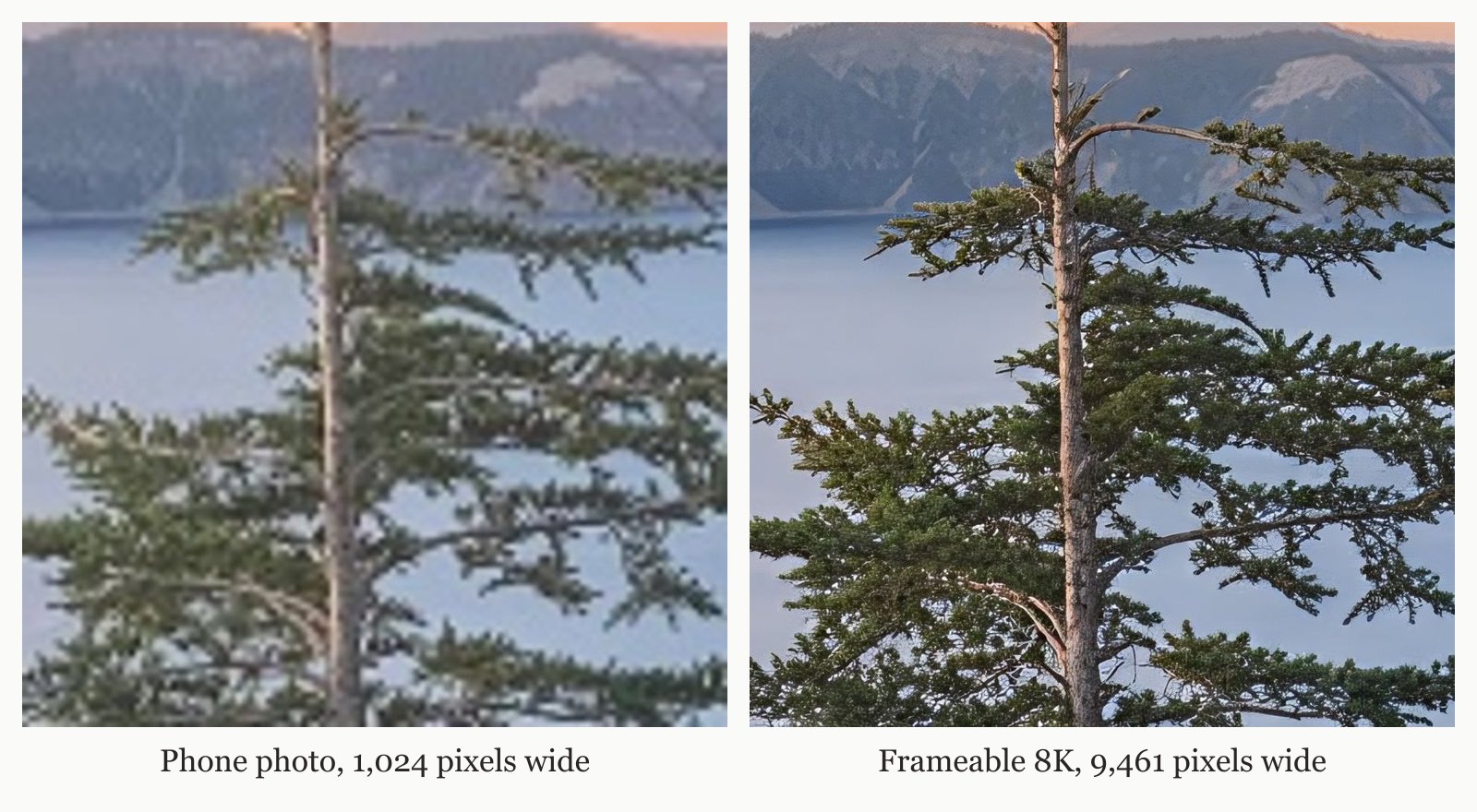
How do you fix a blurry old family photo for print?
You fix a blurry old family photo for print by uploading it to a service that automatically adds resolution before manufacturing the physical frame. Simply enlarging a small digital file makes it look pixelated. Frameable upscales every photo to 8K before it prints.
If you want more details on expanding physical media dimensions, see How to Enlarge Old Printed Photos Without Losing Quality. The answer to Can AI Fix Blurry Old Family Photos? is yes, and a real person checks every order before it prints. Our 8K process ensures your old memories receive the clarity they need for modern framing. Before you order, you pick the size and frame and drag your photo to position it in the frame.
This guarantees your upscaled family portrait is perfectly aligned and ready for production. Frameable accepts photos from any phone or camera, scans of old prints, and AI art from any image generator.
Does scanning an old photo lose quality for framing?
Scanning an old photo does not lose quality for framing if you digitize it properly. We recommend capturing your vintage prints in bright, even light to avoid glare.
Your original paper photo simply does not hold enough data to fill a large frame on its own. When you enlarge a direct scan without adding pixels, the dot density spreads too thin. This is why you need our automatic 8K upscaling. We generate the missing pixel data so your family portraits look intentionally large and sharp on your wall.
Prints are made on archival-grade paper, framed in solid wood, with acrylic glazing that protects against UV. Every order is custom made in the USA and is typically ready to ship in 3-5 business days. Shipping is free within the US, and every frame arrives ready to hang with included hardware. We offer a 100% Happiness Guarantee: if the art arrives damaged or you are not thrilled, we replace it or refund you within 30 days.
Frequently asked questions
Do you accept old photos scanned with a phone camera?
Yes, Frameable accepts photos from any phone or camera. You can snap a picture of your old print with your smartphone and upload it directly. We automatically upscale it to 8K resolution before it prints.
What frame colors are available for vintage photos?
We offer frames in black, white, natural oak, gold, and espresso. You pick the size and frame before you order, and you simply drag your photo to position it in the frame exactly how you want it.
Does the physical framed print include a digital copy?
Yes, every physical print you order from Frameable includes the high-resolution digital copy. This means you receive the 8K upscaled file of your family photo to keep permanently.
How much does a 16x20 framed print cost?
A 16x20 framed print costs $139. If you want the print only without the frame, a 16x20 costs $69. Shipping is free within the US for all orders.
Sources and method
Sources checked November 24, 2026.
- Library of Congress: Preservation guidelines for digitizing library materials
- Wikipedia: Dots per inch
Have a correction or a question about your file? Contact Frameable.
More from the Blog
How To Make Custom Wall Art From Photos
To make wall art from photos, upload your file to Frameable. We automatically upscale it to 8K and frame it in solid wood. Free US shipping.
Read more GuidesPrint A Photo Saved From Facebook Large
Learn how to print a photo saved from Facebook large. Frameable upscales compressed images to 8K so you can frame them up to 36x48 with zero blur.
Read more Framing GuidesBest Shutterfly Alternative For Framed Wall Art
Frameable is the best Shutterfly alternative for framed wall art. We upscale your low-resolution photos to 8K for sharp, large framed prints.
Read more